Charli XCX Brat Font: Recreate the Album Text Style Free
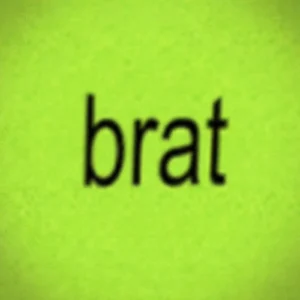
One lime-green square with four blurry letters changed pop culture. When Charli XCX revealed the brat album artwork, the internet did not just listen to the music. It stole the look. Within weeks the blurry lowercase text was everywhere: memes, headers, profile pictures, brand posts. The style is now shorthand for a whole attitude. The best part is you can recreate that exact text look yourself in seconds, free, with no design skills.
What Makes the Brat Text Style So Recognizable
It starts with the blur. The letters look slightly out of focus, like a photo taken in a hurry. That softness is the opposite of polished design, and it is exactly why the style feels honest. Fans often describe it as deliberately low-effort, and that low-effort feeling became the whole point.
Then comes the stretch. The letters look a little wider than normal, slightly squashed and spread. The typeface itself is widely described as resembling a condensed sans-serif similar to Arial Narrow, set in plain lowercase. Nothing fancy, no effects, just raw letters with attitude.
Finally the color. Black text on aggressive lime green. The combination is loud on purpose. It is hard to scroll past, hard to ignore, and instantly recognizable even at thumbnail size. Together, blur plus stretch plus green equals the brat look.
How to Recreate the Brat Font Look Free
You do not need design software. A free text generator does the whole job in your browser.
Step 1: Type your text. Open the brat font generator and type your word in lowercase. Short words hit hardest, just like the original artwork.
Step 2: Pick a condensed bold font. Choose the heaviest condensed sans-serif available. Tight letter spacing sells the stretched look, so keep the text compact.
Step 3: Go green and black. Set black text on a lime-green background. That high-contrast pairing is the signature of the style, so do not soften it.
Step 4: Download and use. Hit download and your image is ready. One simple download, no settings to pick, no watermark. Use it anywhere immediately.
Nailing the Small Details
Keep it lowercase, always. Capital letters break the spell instantly. The whole aesthetic lives in that casual, unbothered lowercase energy, so never let autocorrect capitalize your text.
Less is more. The most iconic version is a single short word. The longer your text gets, the more the effect dilutes. If you need a sentence, split it across multiple images instead of cramming it into one.
Embrace imperfection. Do not clean it up too much. The charm of the style is that it looks thrown together. A slightly rough edge beats a pixel-perfect render every time with this aesthetic.
Where to Use Your Brat-Style Text
Profile pictures and headers first. A brat-style square works as an avatar or a banner that reads clearly at any size. It is also perfect for brat memes that need that raw text-over-image energy.
Then covers, thumbnails, and announcements. Creators use the style for cover art, video thumbnails, and drop announcements. One image, endless placements. Make yours with the free brat generator in seconds.