Brat Generator Browser Extension: Faster Way to
Create On the Go
You’ve probably noticed the “brat” look everywhere over the past couple of years: that lowercase, slime-green, scribbled text style that seemed to take over every feed, album cover, and meme template almost overnight. It’s simple, it’s loud, and honestly, it’s one of those trends people just don’t get tired of remaking for their own posts. I’ve run Brat Generator for a while now, and after watching how people actually use it, one thing became pretty obvious: nobody’s sitting down to “design” anything. You’re mid-scroll, a trend catches your eye, you want to jump on it right then and there, not go digging through five browser tabs first. That’s really why the browser extension exists.
The Problem With Doing This the “Normal” Way
Without an extension, making a brat-style image usually goes something like this: you open a new tab, try to search “brat generator,” or attempt to remember the URL, then wait for the page to load. Once it’s up, you type your text and start adjusting the size and color until it looks right. After that, you download the image and switch back to wherever you actually wanted to post it Instagram, Canva, WhatsApp, a group chat.
None of these steps is hard on its own. But add them up, multiply by however many times a day you want to make a quick brat cover for a story, a caption, or a meme reply, and it starts to feel like unnecessary friction for something that’s supposed to be quick and fun. A trend like this lives and dies by speed if it takes two minutes to make, you’ve usually already moved on to the next thing by the time you’re done.
That friction is the actual reason people started asking us for an extension in the first place. It wasn’t that the website was broken or slow it worked fine. The real cost was switching context: leaving your current tab, losing your train of thought, and having to find your way back to whatever you were doing. Cutting out that one step turned out to matter more than adding any new feature would have.
The Fix: Brat Generator Right in Your Browser
Basically, the Brat Generator extension takes the same tool from Brat Generator and drops it right into your toolbar. You don’t open a new tab, you don’t try to remember the URL, and you’re not sitting there waiting for a page to load. Click the icon, type your text, and the image is done. It’s a small change, but it changes how the tool actually gets used. Instead of being something you visit occasionally, it becomes something you reach for the same way you’d reach for an emoji keyboard fast, casual, and part of your normal scrolling habit rather than a separate task.
What You Can Actually Do With It
Same idea as the website, just squeezed into a smaller window: you type your text, and it shows up in that lowercase, grainy, slightly-blurred look that everyone now recognizes on sight as “brat.” Here’s the part most people miss the first time they open it: it’s not just the original green look. There are a few themes built right in: Brat, Summer, Icon, Queen, Pop, and Aesthetic. So if green isn’t your thing, or you just want your fifth post this week to look a little different, you’ve got options without leaving the popup.
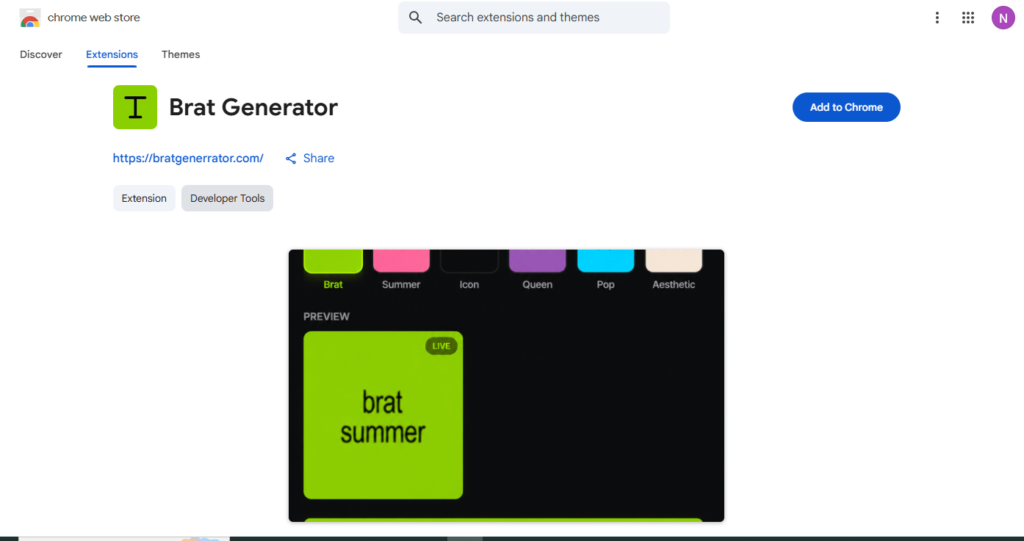
In practice, using it goes something like this: you’re wherever you already are in your browser, you pop the extension open without losing your spot, type your line, watch it update live as you go, pick a theme if you feel like switching it up, and save it. That’s really the whole loop.
Why We Built It This Way
One thing I kept coming back to while working on this: it shouldn’t ask for anything it doesn’t need. Check the listing on the Chrome Web Store, and you’ll notice it’s tiny, under 20KB, and the developer has disclosed that it doesn’t collect or sell your data. That’s not a marketing line; it’s just how Brat Generator has been run on the website too, from the start. People show up to make an image, not to hand over their information to a meme tool.
It’s also why we kept the extension focused on one thing instead of trying to cram in every feature. It generates brat-style text and cover images quickly. If you want more control, different color options, font tweaks, or batch creation, that’s still on the full website. Think of the extension as the fast, pocket version, not a replacement.
Who This Is Actually For
Honestly, it clicks with a pretty specific mix of people. Social media managers who need a brat-style graphic between two meetings and don’t have time to open a design tool. Meme accounts and casual posters who want to react to a trend in the next five minutes, not the next twenty. Students messing around in group chats or on a class project just for fun. And people who were already using the website but were tired of retyping the URL every time. If any of that sounds like you, the extension isn’t a new tool so much as the same one with the annoying part removed.
How to Install the Extension
Installing it barely takes longer than reading this sentence. Go to the extension page on the Chrome Web Store that’s the listing you saw above and hit Add to Chrome. Once it’s installed, pin it to your toolbar so it’s always right there when you need it. No sign-up, no account, nothing else to fill out.
One honest note before you jump in: this is still a young, lightweight extension, and it’s fine with staying that way. If what you need is a quick way to make a brat-style text image without leaving your tab, it handles that well. If you need layers, heavy editing, or exporting in a bunch of formats, the full website is the better call for now; we’re still building out both.
So, What’s the Takeaway?
Trends like the brat aesthetic move fast, and the tools we use to keep up with them should move just as fast. The Brat Generator browser extension isn’t reinventing what the website already does well; it’s just putting it exactly where you need it, at the exact moment you need it, without asking you to break your scroll to get there. If you’ve been bookmarking brat generator or typing the URL from memory every time inspiration strikes, it’s probably time to just install the extension instead. Your next brat-style post is one click away.
Prefer the full site over the extension? The brat generator tool works in any browser with nothing to install.